Apple TV is one of the best streaming devices for IPTV users thanks to its smooth performance, clean interface, and high-quality streaming experience. If you want to watch IPTV using Xtream Codes API, Apple TV makes the setup process simple and beginner-friendly.
In this guide, you will learn how to add Xtream Codes on Apple TV using popular IPTV apps like IPTV Smarters Pro and TiviMate.
Xtream Codes API is a login system used by IPTV providers. Instead of using long M3U playlist links, Xtream Codes allows users to log in with:
Server URL
Username
Password
Most modern IPTV apps support Xtream Codes because it is faster, cleaner, and easier to manage.
To use Xtream Codes on Apple TV, you need an IPTV player that supports Xtream Codes API.
Some of the best IPTV apps for Apple TV include:
IPTV Smarters Pro
TiviMate
IPTVX
XCIPTV
These apps offer:
Live TV support
Movies and series categories
EPG integration
Modern interface
Fast streaming performance
Follow these simple steps to set up Xtream Codes on Apple TV.
Open the Apple App Store on your Apple TV and install an IPTV player that supports Xtream Codes API.
Recommended apps:
IPTV Smarters Pro
TiviMate
IPTVX
After installation, launch the app.
To use Xtream Codes, you need IPTV login information from an IPTV provider.
Usually, your provider will give you:
Server URL
Username
Password
Important Disclaimer:
XtreamCodes.co does not sell IPTV subscriptions or Xtream Codes accounts. This article is for educational and informational purposes only.
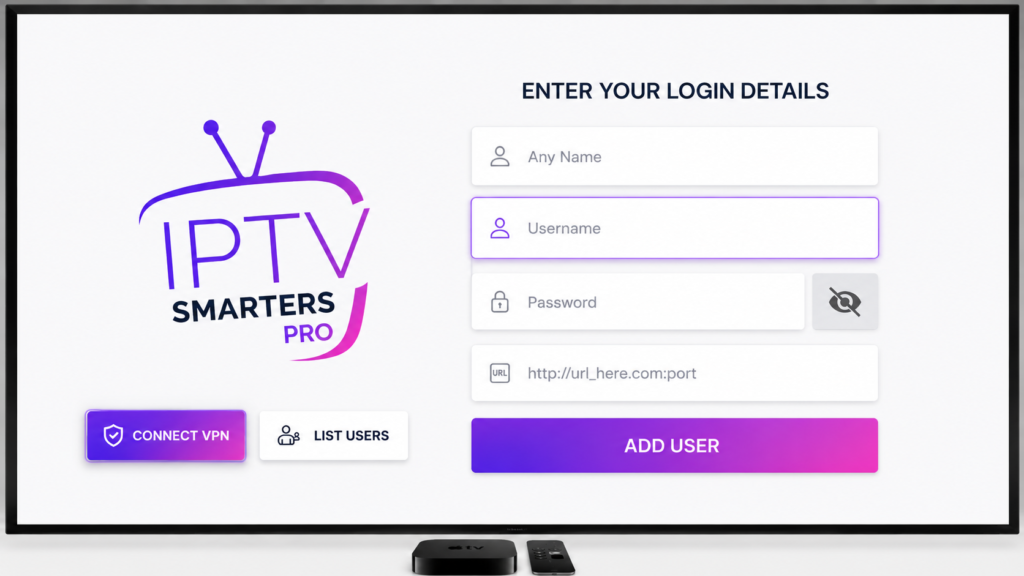
Open your IPTV player and navigate to:
Add User
Login
Xtream Codes API
Then enter:
Server URL
Username
Password
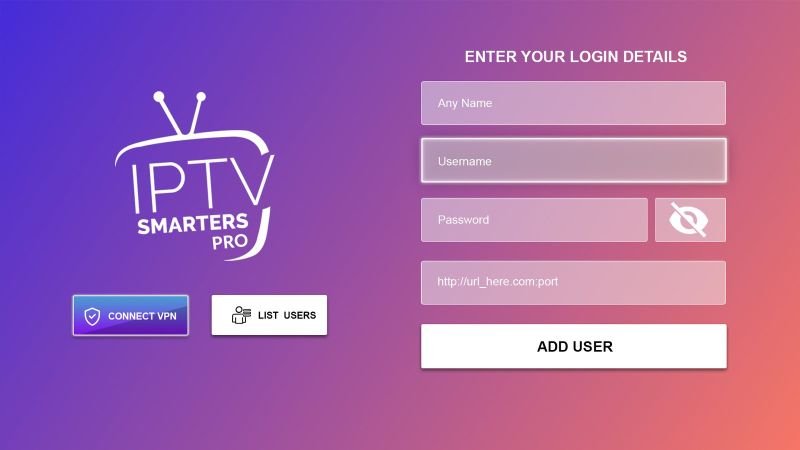
For IPTV Smarters Pro, the login screen will look similar to the image below.
Once the information is entered correctly, click:
Login
Add User
Continue
depending on the app you are using.
After logging in, the IPTV app will automatically load:
Live TV channels
Movies
TV series
EPG guide
You can now enjoy IPTV streaming directly on your Apple TV with a smooth and modern interface.
Using Xtream Codes on Apple TV provides several advantages:
Fast login setup
Better organization
Smooth streaming performance
Easy channel management
User-friendly IPTV apps
Apple TV also offers stable performance compared to many other streaming devices.
If Xtream Codes is not working on Apple TV, check the following:
Make sure the:
Server URL
Username
Password
are entered correctly.
Your IPTV provider subscription may have expired.
A weak internet connection can cause loading issues or buffering.
Sometimes the IPTV provider server may be temporarily offline.
Setting up Xtream Codes on Apple TV is simple and only takes a few minutes. With apps like IPTV Smarters Pro and TiviMate, users can enjoy a smooth IPTV experience directly on Apple TV.
Always use trusted IPTV applications and reliable providers for the best streaming experience.